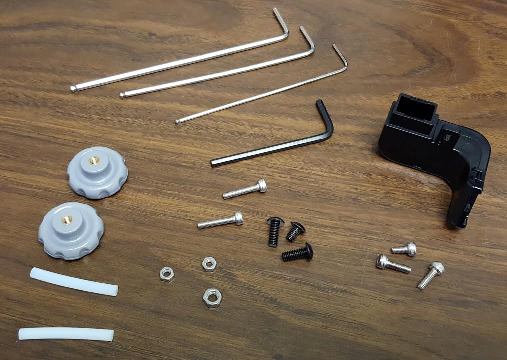
I also just picked up the same PowerSpec 3D Pro 2 printer yesterday at MC. It’s all together but I do have a few parts that I can’t figure out what to do with. There are screws, nuts and 2 little thumb-wheel grey screws with brass inserts.

Are these just spares?

Also there’s the little black piece that I have no idea what it is for. The “sensor” cable shown in the pdf manual didn’t come loose in the box and looks like it’s possible already installed. Guess I will find out on that one.

Not done anything yet to level the bed, power it up, or install the software.

Just found this site this morning and did a search specifically on this printer so this is where it led me. Appreciate any info. Didn’t mean to hj your thread just thought since we are at about the same point in our experience that I would dive in. BTW my spool supports did have 3 nuts on each so they must have just shorted you.
printer_parts.jpg

Yes, majority are spare parts. One thing you want to watch out for on these printers is to print a replacement plastic plate for the one that sits above the extruder that better strain reliefs the loom of wires. As the print head moves around it can (and does) flex the brittle thermocouple wires at to much of an angle causing them to break inside the insulation. They can not be repaired and have to be replaced at that point. I’ll be uploading to ThingIverse one later tonight that I designed and seams to be working quite well (dmyers7). The others on there where tweaked for oddly different mods and therefore the dimensions for the stock parts are slightly off.

Congrats everyone on the new printer purchases :slight_smile:

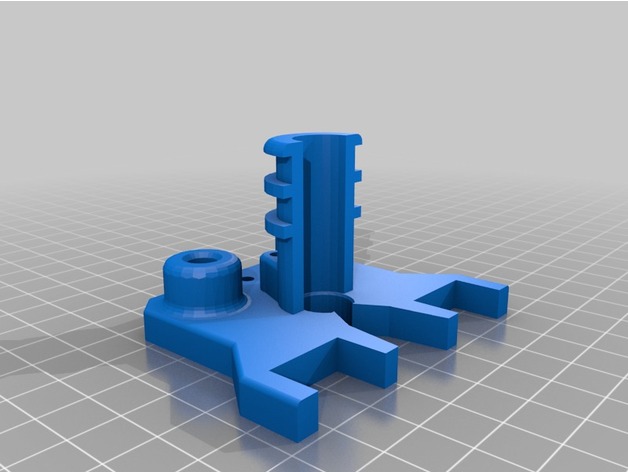
There are tons of spool holders on Thingiverse, but I’m attaching the ones I came up with. These plug up the side handle holes, plus allows you to put the spools on the sides. They are designed to handle the large-hole spools that Microcenter sells. I generally feed the filament around back and under the same-side, back factory-installed spool holders, then up into the filament guide tubes. Haven’t had an issue after printing dozens of spools through the printers (I have two PowerSpec 3D Pro printers).

The next things you’ll want to do is go get a glass print bed set up (buy a sheet of glass or mirror at Lowes/HomeDepot, have them cut it to size, print bed corners and a Z-shim, and a couple cans of Aquanet hair spray).

Other things on the horizon would be active cooling (not sure if the 2 comes with a print-cooling fan), and nozzle upgrades.

It’s definitely an exciting journey :slight_smile:

-Joe
new_powerspec_side_plugv2.stl (120 KB)
new_powerspec_side_spool_holderv2.stl (43.1 KB)

Appreciate you jumping in with comments Joe and offering your parts.

I looked some at nozzles and believe this would be what we need for the PowerSpec 3D pro 2 (x2) when printing some exotic materials. Feel free to correct me if I am wrong or there’s a better source. I have not ordered nozzles just yet probably in the next day or two.

https://www.matterhackers.com/store/printer-accessories/cleantip-stainless-steel-nozzle-1.75mm-x-0.40mm

About the glass bed… So that would be a single pane thickness of glass or mirror correct? The bed corners are just protection for users I assume? What’s the Z shim, something to help with leveling?

Noob here to say the least. I can model in CAD no problem done it many times for several projects just never actually owned or had access to a printer so here we go ha!

I expect everyone has their favorite quick-view for stl files but if not this link is kind of handy. Just drag and drop your file into the window. You can turn it around, color it, etc.

http://www.viewstl.com/

Sounds great, thanks for that tip! Any idea what the 2 white tubes and the little black plastic piece are for?

Still scratching the noodle on those.

Two white tubes are replacement Teflon tubes that go up inside the print head just above the tip. These eventually brake down from the temps the print head runs at, especially at 250c for PETg. Don’t change the length. Will have to review the image again for the black parts you mentioned.

The black part in the image is the fan duct for cooling freshly printed layers of PLA. Install that.

These are the ones I’ve been using in my first-gen PSpec 3d pro printers:

http://www.micro-swiss.com/product-page/29551477-6081-c30f-04fe-cece31e3ba6f

I opted for 1/8in mirror from Lowes:

https://www.lowes.com/pd/Gardner-Glass-Products-1-8-in-x-36-in-x-30-in-Clear-Mirrored-Replacement-Glass-for-Cabinets-and-Picture-Frames/3116821

They’ll cut it up for you for no charge… end up with a bunch of plates :slight_smile:

The bed corners are needed to hold the glass/mirror in place.

The Z-shim is a piece that you place on the moving bed platform right underneath the Z-axis limit switch to account for additional glass/mirror thickness. If you don’t use a shim, the head will crash into the glass the first time you try to level the bed or start a print.

As far as software goes, I’ve been having good luck with Simplify3D for slicing and Blender for STL cleanup.

-Joe

The tips for direct replacement need to be MK10 type. The matter hacker tips will not fit. With respect to the micro Swiss all metal upgrade kit, sounds good but I hear you can no longer print TPU filament because it is the most sensitive to “heat creep” and gets jammed. TPU tends to need the Teflon sleeve present in the stock setup. Mirror or window pane glass along with hairspray works great but I personally don’t mess with binding clips or corner printed brackets as this gives a place for the print head to crash into. Instead I place a small piece of kapton tape front and back center if the aluminum print bed, place a single small drop of CA at each point and place the clean glass on that. This prevents the glass from shifting at all during the print and is cleanly removable if needed. Don’t use more CA than that or you will constrain the glass from expanding when it gets hot and it will break, otherwise works a treat. I also use Simplify 3D, more control and better overall prints. Does cost $$.

A z shim should not be needed? Just wind down the bed leveling adjustments to account for the glass. Works well on my Ultra.

For me, the whole point of going to a glass print bed with printed corners is that the glass is removable after prints. I find that I can put the glass in the freezer to help parts pop off.

It also helps keep the bed level between prints, since you’re not prying/applying pressure to remove parts while it’s on the bed.

YMMV for the Z-shim. I have two of the same PS3DPro printers and they used different springs. On one, the spring would be compressed too much, the other was impossible without a shim.

Did you get time to upload your latest file for the strain relief piece? I looked some today at your files but didn’t see anything that seemed related to the PS 3D Pro 2.

I could probably draw one up myself once I get a chance to work with the printer again and get it set up. That won’t be till the weekend the way it’s looking now.

DB

I’ll try and get that posted tonight and will provide a link.

No worries about HJ the thread! The other questions are actually some I was going to ask.

Like the spare parts that were included, the white tubes, etc.

After a few prints here is where I am at.

Without a doubt Simplify3D is TOTALLY worth it.

I tried ReplicatorG first. It’s ok. Has decent controls for manually controlling the machine. You can change the colors of the LED’s, etc so that’s a cool feature.

Then I tried MakerWare, I didn’t care for that.

I have 15 years experience in CNC machining and tool and die work so when I went to Simplify3D it felt more natural. Offers way more control of the printing process, adding supports, etc. Speeds, layers, everything.

I did order some glass beds for it. I have build fish tanks and reef sumps before and just didn’t want to deal with polishing the edges so they don’t cut me.

On the other hand using simplify3d I was able to adjust the raft size, infill and bed and nozzle temps for the raft so when I printed the glass clips yesterday they popped off WAY easier than any print before. On the stock blue bed.

So far I’ve printed some spool adapters (BTW it does work fine without them and haven’t used them yet.) An LS3 Chevy block, and currently I am printing a pendant. My girlfriend laughed when I printed an engine block and said I thought you were going to print useful things!

Right now the problem I am having is drooping plastic. On the engine block I think I can solve that with supports, but the glass clips had such a minimal overhang I thought they would be ok but they drooped also.

I am going to take some pics today to show you guys and maybe someone can offer some advice.

Thanks! So far I am having a BLAST!!

Pics are always good. Make sure your cooling duct is installed. Without supports the Simplify 3d software will provide a move called a bridge. There are settings to adjust the speed, turning the fan on to force the plastic to harden faster as it’s coming out of the tip and extrusion percentage which effectively “stretches” the plastic to keep it pulled tight when set below 100 or 100%. I usually set this to 87% when not using support. Keep in mind the bridging only works on straight line paths. If your overhang curves at all you will need support. In general support and bridging is only used when the critical angle of the overhang exceeds 45deg (I set mine to 50). Hope this helps.

Useful things ha that’s good ! I have seen quite a bit of fantasy character prints etc etc… my interest is mostly functional parts and pieces that I or other people might need.

I installed the duct, put on a reel of PLA, installed the software as suggested in the manual and fired it up for the first time this evening. I wasn’t really sure about this part of it because I didn’t plan to connect it to the USB on the pc. I just wanted to get the basic parameters set and create a file on the SD card which seemed to work ok. I ran a time lapse of the second print since I was not prepared for the first. Stock everything at this point. Will get mirror glass and already have a new hot end pair with nozzles on the way.

Looking forward to trying some PVA supports and some of my own models.

This is what I ended up with.

https://youtu.be/0k-lMmB5xkg

Geeez there’s a lot to learn and I’m looking forward to it. Will pick up a copy of Simplify tomorrow…

I did see the post about the strain relief component and thanks for sharing that! Tired puppy now and done for the night.

AHH, That’s what the little black elbow is for!

I attached that to the fan tonight. Running another part right now.

I am attaching my first few parts.

The first pic is a progression. Top left is the first print. Bad. The bottom left is the 4th print. I tried painters tape since I was having a really hard time getting parts off the bed. Doesn’t work very well with the heated bed at 100C!!! It also wasn’t right size wise.

The next print to the right is after I bought Simplify3D and found all the parameters for bed temp, raft layers, etc. It popped off pretty easy and fits. These were the spool adapters.

The last print bottom right is the glass bed clamps. They turned out pretty good except for the drooping.

The engine block I printed on fast, .2mm layers, 60C bed and 205C nozzle. It’s ok but the drooping is bad. I printed this before the glass clamps so I thought the clamps would be ok.

The FU hand pics show the better quality of a smaller layer level, better temp control, and supports.

The main questions I have now that I learned a bit about temps feeds and supports is

1: Why would the finger have such a different texture than the bottom? (granted, this was before I put the duct on the fan)

2: What could I change to make the clamps without adding supports? Or is that not possible since it is a 90 degree overhang.

3: What do you use to get the supports off? Some snap off, but the ones inside the palm of the hand look like a problem. I do have a few dremel tools and various bits but when I tried some they grab and dig in.

I am printing a desktop cell phone stand and it is having some other oddities like blobs and strings so when it’s done I will post a pic of that also.
first_6_prints_small.jpg glass_bed_clamp_w_droop_small.jpg 1st_ls3_block_small.jpg 1st_ls3_block_steps_droops_small.jpg fu_pendant_good_and_bad_steps_small.jpg fu_pendant_supports_small.jpg

What made you decide to order a new hot end pair with nozzles already?

I read somewhere about swiss nozzles but I’m curious about your thought process.

Simplify3D is somewhat pricey but it made such a difference in going from “what do I do now” to wow, I am actually glad I bought this thing!

I did hook up the USB cable. I don’t run programs that way but it’s easier to make changes, like LED colors, leveling the bed, moving the machine etc VS using the built in control panel.

I trust running programs from the SD card way more.

One thing I did learn since SD cards are so cheap is 32g seems to be the max for FAT32 formats. I tried a 64G I had laying around but with windows 7 it formats with eFAT, which the machine can’t read.

I must ask, DronePilot, how did you do that time lapse?