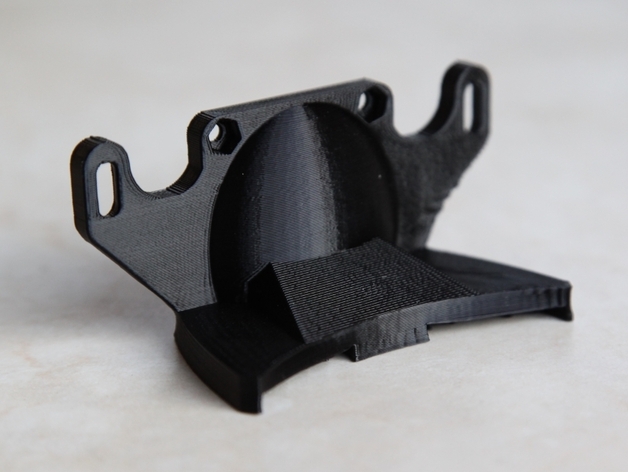
I am keen to purchase this unit for home use. Does anyone have experience with this unit to provide some review?. Thank you.
ISA DAUD
3 Likes
You could check Best 3D Printer Guide 2023 | Hubs as well. Cheers!
1 Like
Hi we have 2 of these units and they are great value for money. They do take a little bit of fettling to get right, so don’t despair when the first few prints don’t come out quite as you’d expect. it’s all in the bed levelling and tweaking it til it’s perfect.
The quality of the output can be amazing and even comparable to machines costing many thousands. A great printer.
2 Likes
Perfect printer but need some tweaks and fans are mandatory for good prints
2 Likes
Hi Isa,
I have the dupicator 4s, “s” meaning the steel version. I’m using it for a few months now and I am happy with it. When I received it, it needed some tweeks to produce good prints like calibrating and tightening the belts. But once it is running it stays pretty stable.
One thing I am still working on is improving the bridging, by using a fanduct (thingiverse) and soldering on a transistor on the the mainboard.
Overal if you like thinkering and improving your printer the price/quality is great. If you’r looking for a ready to use/stable printer the preference should go to Ultimaker, Leapfrog or Makerbot (But way more expensive offcourse  )
)
Regards,
Jamie Carton
1 Like
Hey Isa,
Yes, we have years of experience with this make and model. We provided the Wanhao review for the 3DHubs 3d printer guide too.
Is there anything specific you would like to know?
We supply them here in the UK too.
For the price it is a very good machine. I think it is finding a right balance between cost and output. We found this machine to be very good. We run several technical courses for additive manufacturing and feature the printer for all our training courses.
The reliability has been excellent, only a single motor failure in a whole year, the motor was inexpensive and easy to replace. We own several models.
One of our most recent purchases was the tall D5, at 20 microns, with massive build space AND the ability to turn a dial mid print to speed up (or slow down) prints, we found this a great feature.
Duplicator 4X wood is good for tinkerers and at home type of production.
D4X Transparent is great for show casing as you can “see” all the workings.
D4X Black metal frame with rubber feet is great for workshops or small businesses.
D5’s metal frames, standard size or large size are great for 20 micron layering and speeds.
Let me know if this helped, or if you have further questions.
Scott Knowles
Director and Co-Founder of ObjectForm.co.uk & Fila-Cycle.com
1 Like
Yes, Totally agree - Scott
Duplicator 5’s are printing just as good as the Leapfrog’s now, I unboxed, and so long as the bed leveling is good that is all I needed to adjust 
A great idea for the D4’s, good call.
hi
I have a Duplicator 4S. It is exactly the same as the 4X except it has a steel frame. The newest models comes standard with the sailfish firmware pre-installed. Sailfish is a must for the stability and extra features it adds. It can be difficult installing it yourself if you have an older Mightyboards.
I am very happy with this printer, I had 2 other opensource printers before this one and with this one I can do everything I want. You will need to do some modification to be able to print Nylon and Ninja flex. It is fine for PLA and ABS. You can also add an extra cooling fan for printing with PLA.
I use Simplify3D to print to it, you can use Makerware but I get better results with S3D.
You can print via usb cable but its better to use SD card. You can also install a Toshiba Flashair card so you can upload files via your wifi and don’t have to plug in and remove the card all the time.
There is a very good google support forum here Redirecting to Google Groups
You won’t get a better dual head printer for this kind of money!
2 Likes
I have one, and I’m really happy.
I bought one, a few months ago, the Metal version but had to make some modifications, added a blower to the head and and sd card extention because the Metal version has the card slot really unacessible.
I bought too the Smplify3D to print and i was printing in less than one hour after receiving it in the front door…
Tiago
2 Likes
HI… What king of modifications you did for Nylon or Ninja Flex?
1 Like
Good call on the Simplify3D, we recommend this software to for this model. Nice addition with the Tosh Flash
Yes, this is a good printer, for home/hobby/hubs use.
It needs adjustments, even improvment to be really efficient, parts must be regularly replaced, but overall a good one.
1 Like
hi
For nylon you need to upgrade to all metal hotends from raffle, Redirecting to Google Groups
For Nijaflex you can print another extruder body or there are other modifiction as well Redirecting to Google Groups
2 Likes
I bought it, thinking the dual extrusion was cool.
I dont have much use of it afterall, dual printing does not give a clean result (filament keep leaking due to hot noozle, despite the “cleaning part”).
when I print in one color, it happens the second noozle ruins the printing as soon as there is a little default.
it’s allright, but I would not go for a dual extrusion model
Dual extrusion has always been experimental on a lot of models (there are some models coming out that are great) including the Wanhao.
What I would say is the price difference is non existent. e.g. buy dual and print using only one nozzle. For the price difference, which in this case for the Wanhao’s is negligible, you may as well… you can experiment and if it’s not for you then stick with printing with one extruder.
I will point out that with the dual extruder models you get the opportunity to print in one material (your main object) and then print using PVA (for example). Using PVA for your support structure is fantastic. Does not matter that PVA may leak etc because when the model is printed, pop it in water, let the PVA dissolve and whalla, you get a good printed object this is how its worked for us.
Dual extrusion + PVA supports
2 Likes
+1, Dual Extrusion is really useful when using PVA Support + PLA… You can print anything !
2 Likes
rspehr
19
I use this machine every day. If you live in the Largo / Clearwater / St Petersburg Florida area. Drop by my place. I will show you the machine and how it works for me. It is very dependable. There is another group in St Petersburg that actually manufactures, sells, supports and trains new users on a machine made in the USA. They have even created a new Makers Space in downtown St. Pete. They have a very nice printer that allows for a newer user to get local parts, support, help and a community that would work with you. Not to worry if you are set on the Wanhao Duplicator 4. I love this machine. it is very easy to maintain and quite dependable. I have added some tweaks to my machine, like putting plastic shields on the exterior to keep the heat in. I also use a MakerBot program to interface with the Wanhao. In addition, I rewired the machine so it can be switched off from the front. The machine out of the box switches off in the back. That is a real dumb feature. I added a glass plate to print on. I can show you all this and also tell you more about the Mighty Mo machine in St. Pete. I purchased my Wanhao Duplicator 4 from Josh on Maker Geeks. That guy is awesome. He is 100 percent support on everything. Call me …727-417-7750 or send me mail at rspehr@gmail.com or rspehrdesignfl.com
Looking through all the comments you see a thread that should not be ignored…namely that this printer does require a fair bit of care and feeding. Just about as much as the kit Prusa I3 that I assembled. This might be the case with all 3D printers at this point but be sure that if you buy this one that to get and keep good quality you will be tweeking it!
The additional comment that I would make is to ensure that the printer you buy has a mother board with FET installed to support active cooling. The new models are being shipped like this, the old ones were not. Whether you want cooling right away or not preserve the option to add it later.
2 Likes